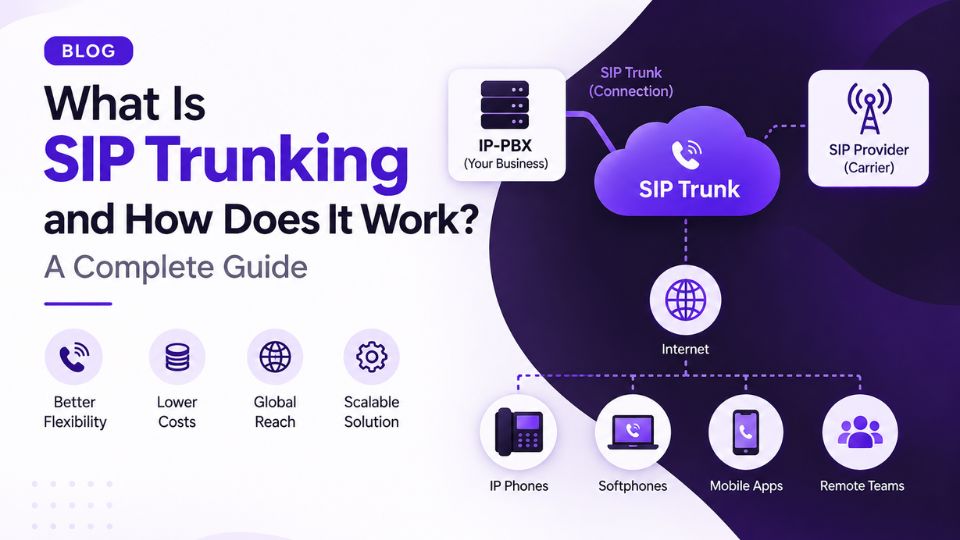
If you have worked with VoIP, an IP-PBX, Asterisk, FreeSWITCH, or business phone systems, you have probably come across the term SIP trunk.
But what exactly is a SIP trunk?
Is it the same thing as VoIP?
How does a business phone system actually connect to a telephone carrier over the internet?
And when a user picks up a phone and dials a number, what happens behind the scenes?
This guide answers those questions from the ground up.
We will start with the basic idea of SIP trunking and gradually move into call flows, protocols, numbering, troubleshooting, security, and real-world deployments.
By the end, you should have a practical understanding of how SIP trunking works — not just a definition you can memorize.
1. What Is SIP Trunking?
SIP trunking is a method of connecting a business phone system to a telecommunications provider using an IP network instead of traditional telephone circuits.
SIP stands for Session Initiation Protocol.
SIP is the signaling protocol used to establish, modify, and terminate communication sessions such as voice calls. In a typical VoIP call, SIP handles the signaling while separate media protocols carry the actual audio.
A simple way to visualize SIP trunking is:
Your phone → IP-PBX → SIP trunk → SIP provider → Telephone network → Destination
For example, imagine a company has 100 employees.
Instead of giving the company 100 traditional telephone lines, the company can deploy an IP-PBX and connect it to a SIP provider.
The employees can then make and receive calls using their existing business numbers while the voice traffic travels over an IP network.
The important point is that a SIP trunk is not the phone itself.
It is essentially the connection between your communication system and your carrier or SIP provider.
A simple analogy
Think of a traditional telephone line like a dedicated physical road between your business and the telephone network.
With SIP trunking, that physical telephone connection is replaced by an IP-based connection.
The actual implementation can vary considerably between providers. A SIP trunk may use registration-based authentication, IP authentication, or other carrier-specific arrangements.
But conceptually, the purpose is the same:
Connect your business phone system to the public telephone network using SIP and IP connectivity.
2. How Does SIP Trunking Work?
To understand SIP trunking, it helps to separate a phone call into two different things:
Signaling
Signaling is the communication that controls the call.
For example:
- Start the call
- Ring the destination
- Answer the call
- End the call
SIP handles this signaling.
Media
Media is the actual voice conversation.
The audio is normally carried separately using RTP, or a secure variant such as SRTP depending on the deployment.
This separation is one of the most important concepts to understand when troubleshooting VoIP.
You can have a situation where:
SIP signaling works, but audio does not.
That is how you can get symptoms such as:
- Phone rings but there is no audio
- Caller can hear the other person but the other person cannot hear the caller
- Call connects and immediately drops
- Audio works internally but not externally
We will examine these problems in much more detail later in this guide.
A Basic SIP Call
Suppose Alice is using an IP phone inside a company and wants to call Bob.
The simplified process looks something like this:
Alice's phone
↓
IP-PBX
↓
SIP trunk
↓
SIP provider
↓
Telephone network
↓
Bob
When Alice dials Bob's number, her phone sends a SIP request to the PBX.
The PBX determines that the call needs to leave the organization's network.
It sends the call toward the SIP provider through the configured trunk.
The provider then handles the carrier-side routing toward the destination.
SIP uses a request/response model. One of the most important SIP messages is INVITE, which is used to initiate a session. Other messages such as ACK, BYE, and REGISTER have specific roles in SIP signaling.
A simplified call might look like:
IP Phone | | INVITE v IP-PBX | | INVITE v SIP Provider | | Call Routing v Destination Network | v Called Party
Once the call is answered, the voice media flows according to the media information negotiated during call setup.
When either party hangs up, SIP signaling is used to terminate the session.
For example, a BYE request can be used to end an established SIP session.
3. SIP Trunking Architecture
A basic SIP trunking architecture can look like this:
INTERNET / IP NETWORK | | +--------------+ | SIP PROVIDER | +--------------+ | SIP TRUNK | +--------------+ | SBC | +--------------+ | +--------------+ | FIREWALL | +--------------+ | +--------------+ | IP-PBX | | Asterisk etc.| +--------------+ | ------------------------- | | | IP Phone IP Phone Softphone
Not every deployment contains exactly these components.
For example, a small installation may connect an IP-PBX directly to a provider.
A larger enterprise deployment may introduce a Session Border Controller (SBC) between the PBX and the carrier.
The SBC can provide functions such as:
- SIP normalization
- Security controls
- NAT traversal assistance
- Topology hiding
- Routing
- Media handling
- Interoperability between different SIP implementations
The exact architecture depends on the organization, provider, network design, security requirements, and number of concurrent calls.
4. SIP Trunk vs Traditional Phone Lines
Before SIP trunking became common, businesses commonly used technologies such as analog telephone lines, T1/PRI circuits, and other traditional carrier connections.
The fundamental difference is the transport technology.
Traditional telephone connection
A traditional telephone service typically relies on dedicated telecommunications infrastructure between the business and the carrier.
SIP trunk
SIP trunking uses IP networking to connect the business's communications system with a SIP provider.
Here is a simplified comparison:
FeatureTraditional Phone LinesSIP TrunkingNetworkTraditional telecom infrastructureIP networkSignalingVaries by technologySIPVoice transportCircuit-based or carrier-specificPacket-basedScalingOften requires additional circuits/linesCan generally be provisioned through IP-based capacityPBXTraditional PBXIP-PBX or compatible gatewayGeographic flexibilityOften tied to physical circuitsCan be more flexible, depending on providerIntegrationMore limitedEasier integration with IP applications
However, it is important not to assume that SIP automatically means "unlimited capacity."
A SIP provider may impose limits based on:
- Concurrent calls
- CPS (calls per second)
- Number of DIDs
- Geographic availability
- Account configuration
- Commercial plan
So when someone says a SIP trunk is scalable, the more accurate statement is:
SIP trunking can make capacity easier to provision and manage because the service is IP-based, but the actual capacity depends on the provider, network, and configuration.
That distinction matters in real-world deployments.
5. SIP Trunk vs VoIP: Aren't They the Same Thing?
This is one of the most common questions.
The short answer is:
No. SIP trunking and VoIP are related, but they are not the same thing.
VoIP
VoIP stands for Voice over Internet Protocol.
It describes the broader technology of carrying voice communications over IP networks.
VoIP can include:
- IP phones
- Softphones
- IP-PBX systems
- SIP
- RTP
- Hosted phone systems
- SIP trunking
- Voice gateways
So VoIP is the broader concept.
SIP trunking
SIP trunking is a specific way of connecting a business communications system to a SIP provider using IP-based signaling.
Think of it like this:
VOIP | +-- IP Phones | +-- Softphones | +-- IP-PBX | +-- SIP | +-- RTP | +-- SIP Trunking | +-- Hosted Voice
A company can therefore use VoIP internally without necessarily using a SIP trunk.
For example, an organization might have:
IP Phone → IP-PBX → IP Phone
The call stays entirely inside the organization's network.
No SIP trunk is required for that internal call.
But if the user wants to call an external telephone number:
IP Phone → IP-PBX → SIP Trunk → Carrier → PSTN → External Number
the SIP trunk becomes the bridge between the organization's IP phone system and the external telephone network.
6. Why Businesses Use SIP Trunking
SIP trunking is popular because it fits naturally with modern IP-based communication systems.
A business can centralize its telephony around an IP-PBX and connect that PBX to one or more carriers.
Depending on the provider and deployment, this can provide capabilities such as:
Centralized call management
The IP-PBX can control:
- Extensions
- Call routing
- IVRs
- Call queues
- Hunt groups
- Voicemail
- Call recording
- Business-hour routing
Easier integration
Because the phone system is IP-based, it can integrate with other software and services.
For example:
CRM | IP-PBX | SIP Trunk | Carrier | PSTN
This allows organizations to build more sophisticated communication workflows around their phone system.
Geographic flexibility
An IP-based phone system can allow employees and offices to operate across different locations, subject to network design, provider support, regulatory requirements, and security controls.
For example:
Office A ----\ \ Office B ------> IP-PBX ---- SIP Provider / Remote Users -/
The exact design depends on whether the PBX is hosted centrally, deployed on-premises, or distributed across multiple locations.
7. The Most Important Mental Model
If you remember only one thing from this section, remember this:
SIP handles the conversation about the call. RTP carries the conversation itself.
For example:
SIP:
"I want to call this number."
SIP:
"The destination is ringing."
SIP:
"The call has been answered."
RTP:
"Here is the actual voice."
SIP:
"The caller has hung up."
This simplified model makes many SIP troubleshooting problems much easier to understand.
If the call never rings, investigate signaling and routing.
If the call connects but there is no audio, investigate the media path.
If authentication fails, investigate credentials or the provider's authentication method.
If the provider rejects the call, inspect the SIP response and the provider's routing or policy requirements.
SIP itself is an application-layer signaling protocol designed to establish, modify, and terminate sessions; it does not itself carry the voice conversation.
What's Next?
Now that we understand what a SIP trunk actually is, the next question is:
What do you need to make one work?
An IP-PBX alone isn't enough.
You need to think about the provider, Internet connection, codecs, firewall, NAT, SBC, authentication, IP addresses, numbers, and routing.
And once everything is configured, what actually happens when someone picks up the phone and dials a number?
Join the IHaveAnswers SIP Discussion - Join Now
Have a SIP trunk that works for registration but fails when making outbound calls?
Getting 403, 408, 488, or 503 responses?
Experiencing one-way audio?
Share your SIP trunk, Asterisk, FreeSWITCH, IP-PBX, or VoIP question with the IHaveAnswers community and discuss the problem with other VoIP professionals and enthusiasts.
Ask a question. Share your configuration. Help someone solve a problem.